Getting to know your followers is very important, even more if you are running a business.
But where do you start, let's say you have 2000 followers.
You could start conversation with them 1 by 1, but if you are a small company where luxury of time is not an option, it could be very inefficient.
Instead, you could scan your network profiles and based on their profile descriptions identify which have certain keywords you may be interested in, and maybe even their location.
Once you have this data, you can segment and check which sector has the biggest list of users.
With programming skills and cloud-based technologies such as Microsoft Azure you can do this easily.
Azure is the Microsoft response for Cloud Solutions, leveraging it's power gives you endless possibilities, and here is an example.
In Microsoft Azure you can create what is called Worker Roles, it's basically a virtual machine running background tasks (similar to Windows Services).
What do you do with it? Depends on what you need, but here is a simple example.
Let's say you want to identify which Twitter users are constantly following and unfollowing you, you can then use the Twitter API to check your current followers, store that information into a database hosted in Microsoft Azure, this information you can use it to identify if these stored users are still following you days later.
You can go even further and use it to get to know your network.
Let's say you store your followers list and their followers list(username and profile description)
Once you have done that you can create custom queries with specific filters and turn them into database views.
Once the views are created you can use Power BI to create reports retrieving the data you want
Then you can schedule the Power BI reports to refresh daily at 6am, to have some updated data by the time people arrive at the office.
To create even more complex and customized reports, you could leverage the power of SQL Server Reporting Services, hosted in a virtual machine running on Microsoft Azure, create report templates published to a URL your team is able to access.
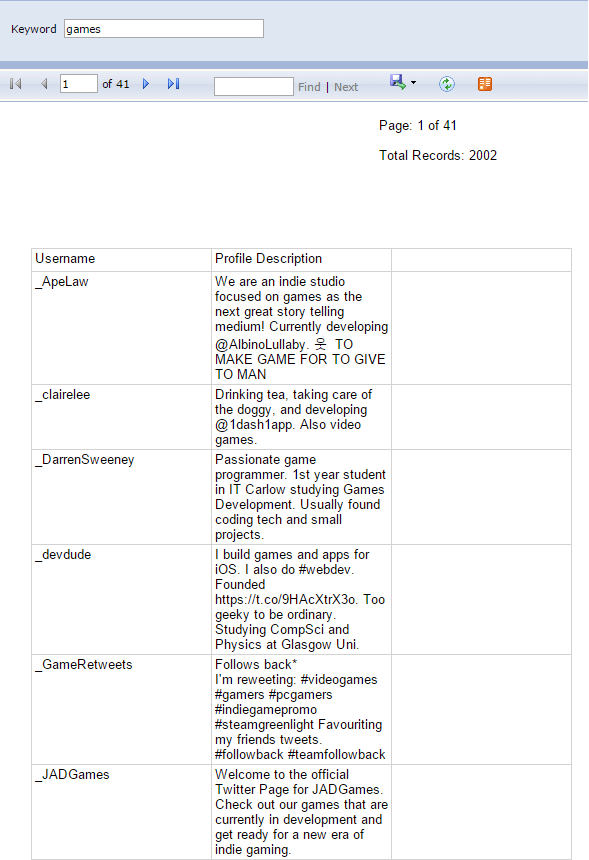
For example a report that gets a list of users and categorize them based on keywords found in ther profile (education, games, marketing, etc)
Or you can create a report requesting the user for a keyword
You can go even further and create subscriptions to reports you know you will need frequently, select how often you need those reports, and the file format and time of the day you want them.
Once you set that you could have for example a report for the keyword "marketing" every day at 9pm sent to your email.
Feel free to comment on the post.