Customer Finder by PTI Costa Rica is a Cloud-Based system which has the objetive to help Entrepreneurs and SMBs to identify Potential Customers, by leveraging the power of their Social Media Profiles.
The first phase of the project uses Twitter only.
Customer Finder allows users to gather information of their First and Second Level followers.
With Customer Finder, users can search for contacts on Education, Engineering, Medicine, Videogames, and more.
Customer Finder also allows users to get insights of what their network is talking about,
which words are being used the most.
Customer Finder allows users to get insights of what a specific individual in their network is talking about, and also allows users to identify the possible general mood of a contact.
You can see more more about Customer Finder on our Facebook Page, feel free to like it.
In this blog we share information, tutorials, demos, work in progress and more in game development and cloud-based services.
Please remember to visit our main website at: http://www.pticostarica.com
Subscribe to our Blog
Mostrando las entradas con la etiqueta Power BI. Mostrar todas las entradas
miércoles, 28 de septiembre de 2016
martes, 19 de abril de 2016
Sample - Combining The Power of #Azure and #Office365
Microsoft Azure and Office 365 are two platforms that alone, give you tremendous opportunities, and when you take its pieces and integrate them together, you can create amazing solutions.
This sample shows Report in Power BI containing a List of profiles for CEOs using Twitter.
This sample shows a Report in Power BI containing a List of profiles for Founders and Co Founders
These examples are using Azure to process and filter the data.
Feel free to share on your social profiles.
In order to keep learning about Microsoft Azure, Office 365, and Game Development feel free to subscribe.
miércoles, 30 de marzo de 2016
¿Cómo conocer el alcance de su negocio con Azure y Office 365?
A la hora de tener un negocio, es de vital importancia tener datos que nos ayuden a conocer mejor a nuestros clientes potenciales y a nuestra red de contactos.
Microsoft Azure y Office 365 nos ayudan a facilitar éstas tareas ligadas a nuestra estrategia en redes sociales.
Si tenemos por ejemplo una estrategia donde utilicemos la red Twitter, podemos utilizar Microsoft Azure para obtener información acerca de nuestra red de seguidores en Twitter, y procesarla de manera que podemos identificar cosas cómo
- Personas con negocio propio.
- Personas con títulos como CEO, Gerente, Presidente.
- Personas en Recursos Humanos
- Personas en Ventas
- Personas en Marketing
En fin, los datos nos dan posibilidades ilimitadas,
combinando herramientas como Power BI, podemos también conocer un poco acerca de la distribución geográfica de nuestra red, lo cuál nos puede ayudar bastante para identificar donde estamos teniendo mayor efecto con nuestra estrategia digital, y de ser necesario, revalidar quienes son nuestros clientes potenciales.
miércoles, 3 de febrero de 2016
One more of the many ways to integrate #Azure, #SharePoint Online and #PowerBI
Microsoft Azure allows you to create many different and interesting solutions to solve your business needs.
In this video we show you how you can integrate Microsoft Azure, SharePoint Online and Power BI to verify the health of a list of websites stored in an excel file hosted in your SharePoint Online library.
Click on the image to see more
In this video we show you how you can integrate Microsoft Azure, SharePoint Online and Power BI to verify the health of a list of websites stored in an excel file hosted in your SharePoint Online library.
Click on the image to see more
![]() |
| Integrating Microsoft Azure, SharePoint Online and Power BI to check websites status |
sábado, 9 de enero de 2016
Cómo crear, personalizar y exportar sus listas en #SharePoint Online y verlas en #PowerBI con @Office365
SharePoint
Online es un software de colaboración para equipos, contenido en Microsoft
Office 365.
Tiene varios propósitos, entre los cuales se encuentran funcionar
como una Intranet, un sistema de administración de documentos, búsqueda
empresarial y administración de contenido y flujos de trabajo.
Una
de las grandes ventajas de SharePoint Online es que se puede personalizar,
Por
ejemplo si usted necesita un pequeño sistema de entrada de datos, puede crear
listas personalizadas en poco tiempo.
Veamos
un ejemplo de como crear una lista de Ingresos vs Gastos Mensuales.
Para
ello vamos a la página principal de nuestro sitio en SharePoint Online y
buscamos la opción Add lists, libraries, and other apps.
Una vez que estamos en la sección de aplicaciones seleccionamos Custom List y procedemos a nombrar la nueva lista, en este caso la llamaré Ingresos vs
Gastos - List y una vez que se cree procedemos a
seleccionarla, en el menú Recent o en el contenido de la página en la que nos
encontramos.
Seleccionamos List, luego List Settings, y procedemos a agregar las columnas que necesitaremos,
en
este caso utilizaré 4 columnas:
Fecha : Date And Time
Ingresos : Currency
Gastos : Currency
Diferencia: Calculated Currency
Todas
requeridas.
Regresamos
a la página y procedemos a llenar los datos.
Una vez que los llenamos, podemos seleccionar Export to
Excel desde el Ribbon y
abrimos el archivo, luego guardamos el documento en nuestro equipo,
preferiblemente en una carpeta configurada para ser sincronizada con OneDrivefor Business
Ahora
configuramos nuestro archivo, para que los datos se refresquen a partir de
nuestra lista de SharePoint, para ellos vamos a Data, y seleccionamos
Connections, hacemos click en Properties y seleccionamos Enable background
refresh y Refresh data when opening the file.
Si
queremos verificar si los cambios se refrescan, procedemos a editar una entrada
en nuestra lista en SharePoint Online, y en Excel hacemos click en Refresh All,
los cambios se verán reflejados.
La
ventaja de tener nuestro archivo almacenado en OneDrive for Business, es que
nos permite consumirlo desde Power BI y crear Dashboards con información
consumida de varias fuentes de datos.
¿Cómo
utilizan usted SharePoint Online y Power BI?
martes, 27 de octubre de 2015
Get To Know Your #Network with @Microsoft #Azure and #Office365
Getting to know your followers is very important, even more if you are running a business.
But where do you start, let's say you have 2000 followers.
You could start conversation with them 1 by 1, but if you are a small company where luxury of time is not an option, it could be very inefficient.
Instead, you could scan your network profiles and based on their profile descriptions identify which have certain keywords you may be interested in, and maybe even their location.
Once you have this data, you can segment and check which sector has the biggest list of users.
With programming skills and cloud-based technologies such as Microsoft Azure you can do this easily.
Azure is the Microsoft response for Cloud Solutions, leveraging it's power gives you endless possibilities, and here is an example.
Let's say you want to identify which Twitter users are constantly following and unfollowing you, you can then use the Twitter API to check your current followers, store that information into a database hosted in Microsoft Azure, this information you can use it to identify if these stored users are still following you days later.
You can go even further and use it to get to know your network.
Let's say you store your followers list and their followers list(username and profile description)
Once you have done that you can create custom queries with specific filters and turn them into database views.
Once the views are created you can use Power BI to create reports retrieving the data you want
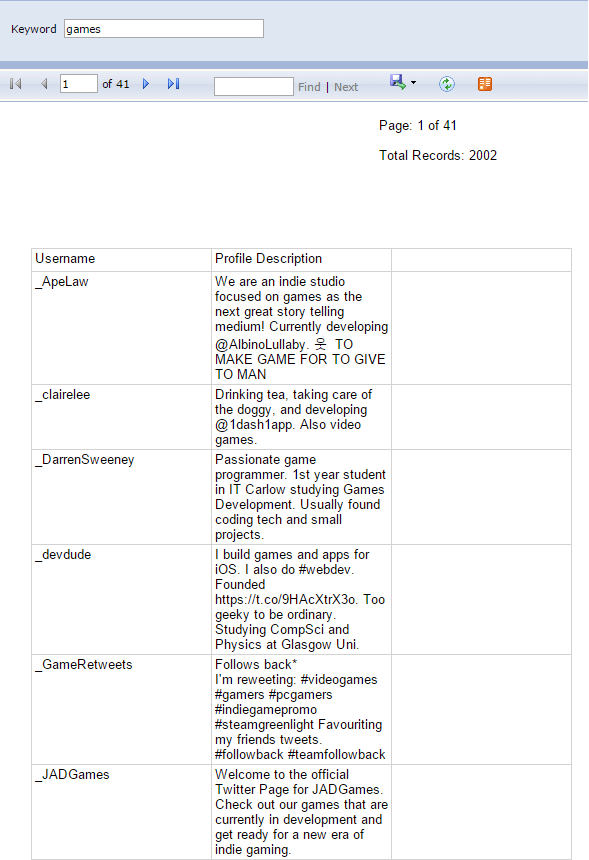
To create even more complex and customized reports, you could leverage the power of SQL Server Reporting Services, hosted in a virtual machine running on Microsoft Azure, create report templates published to a URL your team is able to access.
For example a report that gets a list of users and categorize them based on keywords found in ther profile (education, games, marketing, etc)
Or you can create a report requesting the user for a keyword
You can go even further and create subscriptions to reports you know you will need frequently, select how often you need those reports, and the file format and time of the day you want them.
Once you set that you could have for example a report for the keyword "marketing" every day at 9pm sent to your email.
But where do you start, let's say you have 2000 followers.
You could start conversation with them 1 by 1, but if you are a small company where luxury of time is not an option, it could be very inefficient.
![]() |
| Image by Zigomitros Athanasios - Thor4bp on https://commons.wikimedia.org/wiki/File:Social_Network.png |
Once you have this data, you can segment and check which sector has the biggest list of users.
With programming skills and cloud-based technologies such as Microsoft Azure you can do this easily.
Azure is the Microsoft response for Cloud Solutions, leveraging it's power gives you endless possibilities, and here is an example.
In Microsoft Azure you can create what is called Worker Roles, it's basically a virtual machine running background tasks (similar to Windows Services).
What do you do with it? Depends on what you need, but here is a simple example.
Let's say you want to identify which Twitter users are constantly following and unfollowing you, you can then use the Twitter API to check your current followers, store that information into a database hosted in Microsoft Azure, this information you can use it to identify if these stored users are still following you days later.
You can go even further and use it to get to know your network.
Let's say you store your followers list and their followers list(username and profile description)
Once you have done that you can create custom queries with specific filters and turn them into database views.
![]() |
| Try Microsoft Office 365 Today for FREE |
Once the views are created you can use Power BI to create reports retrieving the data you want
Then you can schedule the Power BI reports to refresh daily at 6am, to have some updated data by the time people arrive at the office.
To create even more complex and customized reports, you could leverage the power of SQL Server Reporting Services, hosted in a virtual machine running on Microsoft Azure, create report templates published to a URL your team is able to access.
For example a report that gets a list of users and categorize them based on keywords found in ther profile (education, games, marketing, etc)
Or you can create a report requesting the user for a keyword
You can go even further and create subscriptions to reports you know you will need frequently, select how often you need those reports, and the file format and time of the day you want them.
Once you set that you could have for example a report for the keyword "marketing" every day at 9pm sent to your email.
Feel free to comment on the post.

If you want to know more about the potential of Microsoft Azure, Web Roles, Office 365, Reporting Services or other, feel free to contact us from our website or send an email to services@pticostarica.com
Suscribirse a:
Entradas (Atom)